


.png)
Pickup Verification on Grubhub - EVERYTHING You MUST Know!!

So recently, I have noticed some new features on the Grubhub platform that have to do with the new pick-up verification system. I've noticed some interesting things about this system—some good, some questionable, and some that could completely change the relationship between drivers and restaurants.
So in this video, We are talking about:
EVERYTHING You MUST Know about the Pick-Up Verification System
What they told you vs How it ACTUALLY is
Everything in between!
Disclaimer: The content of this video does not contain and is never intended to be legal, business, financial, tax, or health advice of any kind. This video is for entertainment, educational, and informational purposes only. It is advised that you conduct your own research and consult with qualified professionals before applying anything you find online.
I also want to be clear that everything we are going to go over is very market dependent, and what applies to me and my market may not apply to you.
What Grubhub Says About Pickup Verification
The following information was pulled from the Grubhub help pages under the Pickup Verification FAQ.
Why am I being asked to verify my pickup?
We are introducing verification steps to increase the likelihood every driver leaves with the correct order. This prevents order mix-ups, stops other drivers from accidentally taking your bags, and protects your earnings and account standing by ensuring accuracy at the start of the delivery.
Pickup verification is something that both parties needed desperately and each side, being drivers and restaurants, and everyone tried to figure it out on their own but it created a lot of discourse between the two groups.

On one hand, restaurants were concerned that they would be stolen from by people pretending to be drivers by those who yell out “Picking up for Grubhub”, and just walk in and get an order, despite them not being a driver, having an old screenshot, or the employee not giving a crap and not really checking.
Not to mention, there are still some drivers who do just unassign after grabbing the order and not confirming that they received it.
And on the other hand, the methods restaurants have created seems to push the risk unfairly onto the driver as well by manipulating drivers or creating false reports which lead to receiving violations on their end.
For example, restaurants have forced drivers to claim they had the order before completing it, finished packing it or handing it over and in the event the driver stood up for themselves and tried to reason with them and explain how it affect them and how the system ACTUALLY worked, they were banned from the store, and false reports were made about them.
Chick-Fil-A was NOTORIOUS for that, and it’s ironic how such a “christian company” condoned discrimination of this nature and treated drivers like criminals just for making a living.
Mister01 Extraordinary Pizza in Boca Raton was also notorious for that as well, leading to a dispute between us that is also public information.
That said, when changes of this nature were introduced on Doordash, the relations between drivers and merchants became a bit better because they had to verify that they received the right order and it removed the questions of “did they confirm the order” or “is this guy going to steal my food” before they ask if it is going to be a problem.
So it is a good move on Grubhub’s part, but execution makes a huge difference.
How do I verify an order?
Depending on the restaurant, the app will automatically prompt you with one of three methods:
QR Code Scan: Primarily for Wonder restaurants.
Confirmation Code Entry: Entering a 4-digit code found on the receipt.
Photo Verification: Taking a quick photo of the bag or receipt
The app interface will always dictate which specific method to use for your current pickup.

So these aren’t really new methods either. UberEats has a QR scan mode, which sometimes prompts you to use it and sometimes they print the receipt just for you not to scan. I also am not aware of what a “wonder restaurant” is either though, so there is also that.
Confirmation codes are used quite often in fast food locations and in the event that they don’t have those on the receipt, you may be asked but you can say that the receipt doesn’t have a code and then just defaults to the photo verification.
Photo verification is probably my favorite among these. They are simple, already part of our workflow and generally a universal technique for verification.
Of course, no verification system works perfectly, so let's talk about what happens when things go wrong.
Troubleshooting & "Fallbacks"
We know things don't always go perfectly at the restaurant. If you encounter an issue, every verification method has a photo fallback option so you can complete the pickup without calling Driver Care.

I feel like this is an important fallback but honestly, I think it would make just as much sense if we just stuck with the photo. Keep it simple, no need to complicate an already complicated process.
I think a lot of people think delivery is easy because they only see the driver pick up an order and drop it off, not the person on the back end having to verify if it actually got there so if a customer claims they had their order stolen, they can confirm that the information is correct.
There are a lot of instances where that happens anyway but nevertheless, there is more that goes on with food delivery than simply “pick-up” and “drop-off”.
If a QR Code won’t scan:
If the code is damaged or the scanner isn't working:
Tap "Something's wrong".
Select "Code won't scan" or "Code unavailable".
You will be prompted to take a photo of the receipt on the bag to proceed.
I personally haven’t dealt with this first hand. Most of mine have been photos and 1 confirmation code request. I also am not familiar with what a “wonder restaurant” is either.
I am aware that Wonder now owns Grubhub but I am not familiar with which restaurants are considered “wonder restaurants.”
If a Confirmation Code is missing or unreadable:
First, confirm the receipt type matches what is shown in the app. If it doesn't match, you'll be moved to the photo flow immediately. If it does match but you can't find or read the 4-digit code (e.g., it's stapled over):
Tap "Can't find receipt code?".
Select "Can't read code" or "Code unavailable".
You will be prompted to take a photo of the receipt/bag to proceed.
Ironically, this was in fact the process I had to go through for the one time I received a code request.
Straight-to-Photo:
For certain restaurants, the app will skip codes and ask for a photo of the bag/receipt immediately. Simply take a clear shot where the diner’s name or order number is visible.
Like I said, they might as well just make this the sole system because this is also the most common system within Grubhub as well.
Why is explicit verification (QR/Code) better than a photo?
While the photo fallback is always there to keep you moving, using the QR Scan or Confirmation Code provides the highest level of protection for your account. These "explicit verifications" are the best way to show you picked up the correct items.
First of all, I love how they made a clapback knowing damn well that it would be questioned and I am egotistical enough to believe they made that for me specifically.
Second, I can see why they feel that way. A QR code or confirmation code that can only be confirmed if it is the correct one as opposed to a photo which is faster, but doesn’t confirm accuracy until after the fact.
So I can appreciate at least having some systems available to you to verify accuracy before it is a problem later.
What Reddit Says About Pickup Verification
The next thing I want to cover is some concerns from the community, and by “the community”, I of course mean Reddit. Whenever a platform rolls out a new feature, drivers usually have opinions immediately. So let's see what people are actually saying.
Copying Doordash?
Look, I am not going to give anyone a shout out on this one because it has been said so many damn times in general, and not just on Reddit, but a lot of people have been saying that they are just copying Doordash, and you know what? Fair.
I hate to act like Doordash is big for the right reasons, and there are a lot of people who have many gripes with them for valid reasons. I still have to give credit where credit is due, companies don’t copy companies who are doing something that doesn’t work.
Not to mention, I kind of like how a lot of these systems are kind of universally operating in a similar way. There is no need to reinvent the wheel in a way that isn’t helpful, just keep showing up the right way every time regardless of which platform you are on.
However, I would like to mention that I saw this with UberEats before I saw it with Doordash.
Grubhub Volume Issues
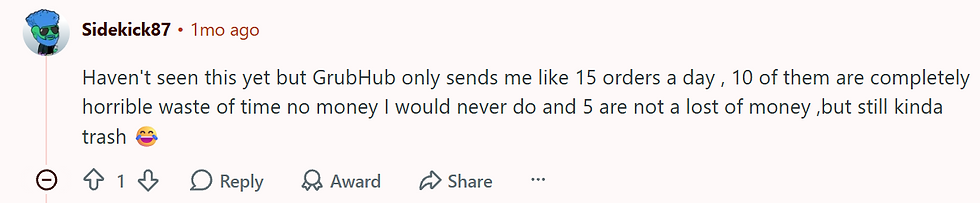
Haven't seen this yet but GrubHub only sends me like 15 orders a day , 10 of them are completely horrible waste of time no money I would never do and 5 are not a lost of money ,but still kinda trash 😂
This kind of highlights an issue with Grubhub as well as why people are so quick to associate updates like this with Doordash as opposed to saying “oh look, a new feature”. If Grubhub isn’t providing enough volume in a way that keeps them on the forefront, it is easy to forget them in general.
I’ll say this, I have recently been reactivated on Doordash and I have absolutely noticed how I am receiving more orders as well as more quality orders from Doordash than Grubhub, so it is definitely noticeable.
Anti-Theft?
If it keeps drivers from stealing orders, I'm fine with it. I hate going to restaurants and being told that it has already been picked up. Wastes less time. I'm sure it's market specific.

Maybe, but let’s not forget that this may be a tool to fight against fraud after the fact, but it doesn’t exactly pop out of the screen and smack the food out of their hand. It doesn’t stop bad people from being bad, only slightly deters it.
It’s smart so the driver can cover themselves when lying customers strike

Okay, I am glad that we are acknowledging both sides here. It protects the drivers from fraud just as much as the merchants but this is only as good as Grubhub’s ability to enforce things the right way.
A lot of these companies like to defer these systems to A.I., so if they don’t follow the proper procedures to deactivate bad customers and not just create features for the purpose of looking like they are just doing their jobs and not just a human in the Philippines hitting a button and calling it a human review.
Reliant on “Grubhub Receipts”
Specifically speaking on the QR code and number codes for pick-ups, Grubhub’s ability to verify an order before pick-up is specifically dependent on restaurants' choice to use Grubhub’s receipts.
The only time I was asked to put in a code to pick-up the order, I needed to use photo verification to move forward because they used their own receipts instead of Grubhub’s, which on paper doesn’t sound like a big deal until you realize the codes are only on the Grubhub receipts.
Unless you write it on, but that just adds more work than it is worth. Like the entire point of having these receipt systems is to save time and money, that only creates a different layer of work that is super easy to goof up and create more work for restaurants.
Is security more valuable than convenience? Let me know in the comments if you think that is the case in this industry.
Grubhub Already Did This Better Than Most
In terms of order confirmation, Grubhub did something better than UberEats and Doordash already before even leveling up to receipt scanning and codes.
They created a system where the order confirmation screen that was separated from the leaving store screen and the way that the “got order” screen changes to the “leave store” screen, which is incredibly valuable for restaurant and driver relations.
On Doordash and UberEats, the “order confirmation” screen and the “leaving store” screen was one in the same and restaurants forced drivers to push confirmation all the way to “on your way to the customer” before handing the driver the food.
Which puts drivers at risk of contract violations, poor ratings, and wrongful deactivations. So adding this may not change things that much, but it has worked on other platforms.
Final Thoughts
Whether drivers are running one app or five apps, the reality is that clear verification systems benefit everyone involved. Restaurants know orders are going to the right driver, drivers have more protection against fraud, and platforms have better data when something goes wrong.
What's interesting is that we're starting to see all of these platforms arrive at many of the same conclusions. Whether it's QR codes, receipt scans, photo verification, or confirmation screens, everybody seems to be moving toward the same basic principles.
That doesn't mean every platform will execute them well, but it does suggest the industry is starting to agree on what works and what doesn't.
And honestly, that's probably a good thing for drivers, restaurants, and customers alike.
If you would like to add some other perspective to Pickup Verification on Grubhub, feel free to email me: drivenwyld@gmail.com and who knows? Maybe your email or perspective and be featured in a post as well!


Comments